networks
Every machine. Every network. One list.
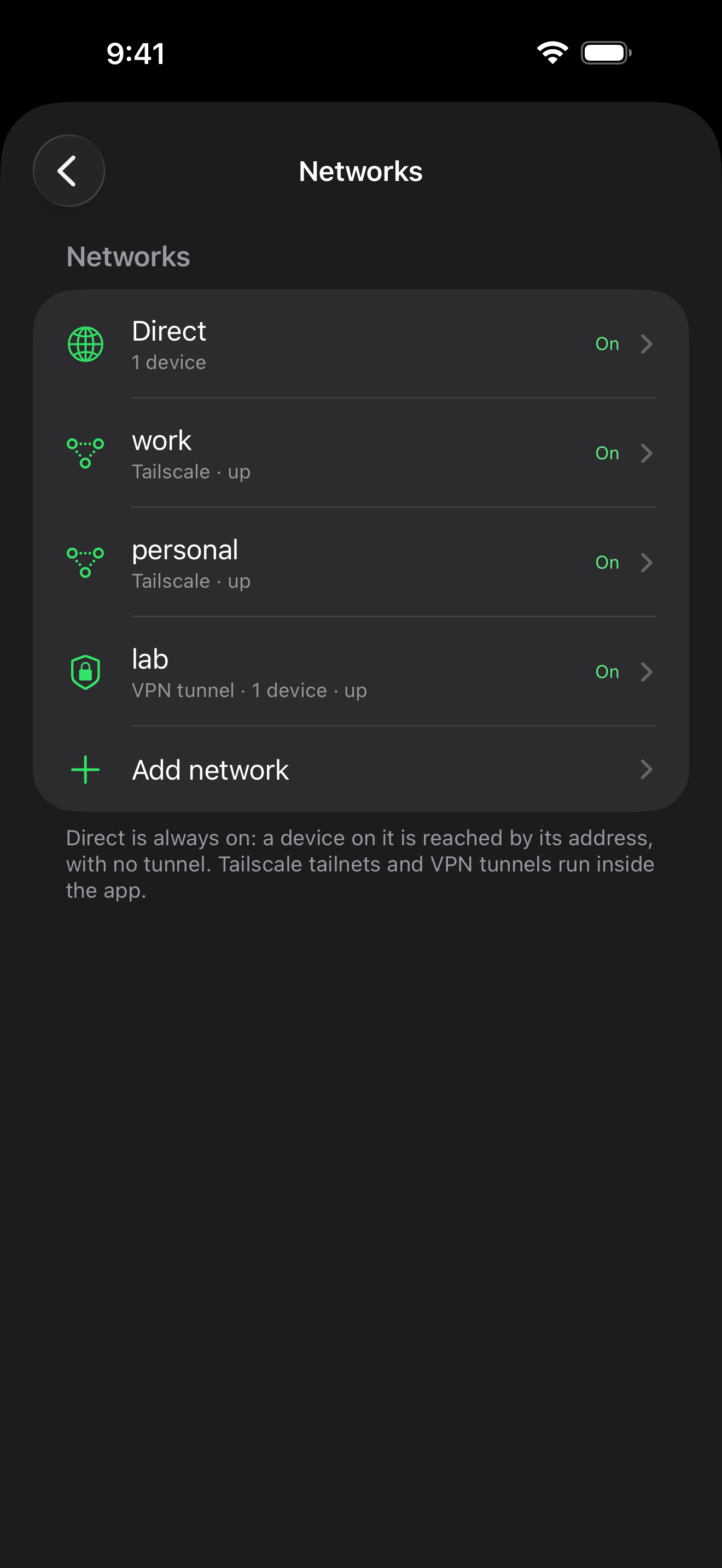
tmuxnet reaches each machine over a route of its own: a Tailscale tailnet, a VPN tunnel, or plain SSH. All of them stay connected at once.
iOS allows one VPN at a time. tmuxnet runs its tailnets and tunnels inside the app instead, so they never take that slot and no VPN profile is installed. A machine you can already reach over SSH needs no tunnel at all.
connection
3 moves · table B
Attach in three moves.
Add your networks
Sign in to Tailscale, or paste your VPN tunnel's config file. A machine you can already reach over SSH skips this move: it uses Direct, which is always on.
Add your machines
Machines on a tailnet appear on their own. Add anything else by hostname or IP, a LAN box, a VPS, a machine behind the office VPN, on the network that reaches it.
Attach
Sessions show up with live previews and agent status. Tap one to attach, and switch without killing anything.
direct
SSH by address, no tunnel · always on
tailscale
a node inside the app · several tailnets at once
vpn
a tunnel inside the app, in multiple protocols · several tunnels at once
table B: the routes, picked per machine. Every one ends as SSH into the machine.
each machine needs only tmux and sshd · any route above that reaches it